> For the complete documentation index, see [llms.txt](https://monkey-gun.gitbook.io/monkeygun/llms.txt). Markdown versions of documentation pages are available by appending `.md` to page URLs; this page is available as [Markdown](https://monkey-gun.gitbook.io/monkeygun/guides/authored-scripts.md).
# Authored scripts
Write the scenes yourself. Exact numbers on screen, real charts, clips from your logo, Giphy loops, sound design and transitions, with no director in the loop.
Send `script` on `from-data` (or `create_video`) and the director is skipped. Creation is voice, visuals and render only: no model timeout, no invented copy, and the price is what you asked for.
```json
"script": {
"title": "Smart money moved on $AI",
"vo": "Fresh wallets threw twenty-nine million dollars at A I this week. The smartest wallets on chain quietly pulled out two million. Nansen has the receipts. Trade it on tokenslop dot fun.",
"cta": "Trade $AI on tokenslop.fun",
"music": { "mood": "dark cinematic tension", "bpm": 92 },
"scenes": [ … ]
}
```
`vo` is the full narration, read as written (about 2.6 words per second). Scene durations are re-fitted to the recorded voice, so keep their sum close to the runtime the narration needs.
## Scene fields
| Field | Values | What it does |
| ------------- | ----------------------------------------------------------------------- | ----------------------------------------------------------------------------------------------------------- |
| `type` | `title` `visual` `data` `chart` `quote` `cta` | Layout and default motion |
| `text` | string | On-screen copy. On `data` and `chart` scenes it is the card title |
| `duration` | seconds | Re-fitted to the voice; keep proportions |
| `motion` | `kinetic` `countup` `slide` `zoom` `typewriter` `still` `slam` | How the card enters. `slam` hits in at 1.7× with a shake, for hero numbers |
| `transition` | `wipe` `cut` `dissolve` | How this scene hands off to the next. `wipe` is the pack's accent sweep (default) |
| `stats` | `[{ value, label }]`, 2 to 4 | Stat pills with count-ups on a `data` scene |
| `chart` | object | A real chart, see below |
| `asset` | `{ url }` or `{ path, kind }` | Media behind the text: a public image or mp4 URL, or a library file |
| `stillIndex` | number | Use still N from the source pack (from `imageUrl` and logo arrays in `data`) |
| `frame` | `phone` `laptop` `card` | Show the image inside a device |
| `clipPrompt` | string | With `clips` on the call: generate an AI clip for this scene, image-to-video from its still when it has one |
| `sfx` | `impact` `whoosh` `riser` `tick` `keys` `none` or `{ assetId, volume }` | Sound effect on this scene. Omit for the pack's automatic pick |
| `grounding` | string | The fact this scene rests on (kept with the video) |
| `imagePrompt` | string | With `images: "generate"`: the image to generate for this scene |
## Stat cards
```json
{ "type": "data", "text": "The scoreboard, 7 days", "duration": 5, "motion": "slam", "sfx": "impact",
"stats": [ { "value": "+$29.1M", "label": "fresh wallets" }, { "value": "−$2.1M", "label": "smart traders" }, { "value": "+$5.1M", "label": "exchanges" } ] }
```
Values keep their exact digits. With `motion: "countup"` (the default for data scenes) the digits animate up in tabular figures; any other motion shows the final figure at once.
## Charts
```json
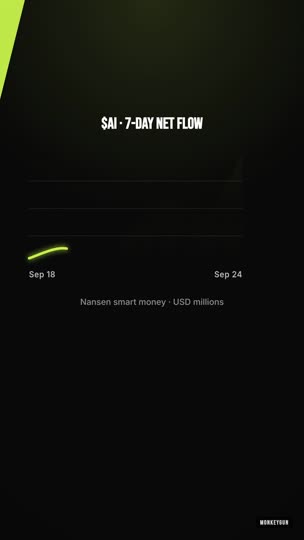
{ "type": "chart", "text": "$AI · 7-day net flow", "duration": 6, "sfx": "keys",
"chart": { "kind": "line", "series": [1.2, 1.4, 1.1, 1.9, 2.4, 2.1, 3.3], "labels": ["Sep 18", "", "", "", "", "", "Sep 24"],
"valueFormat": "usd", "title": "Smart money · USD millions" } }
{ "type": "chart", "text": "Smart money in vs out", "duration": 6,
"chart": { "kind": "bars", "series": [ { "t": "Mon", "v": 120000 }, { "t": "Tue", "v": -40000 }, { "t": "Wed", "v": 210000 } ],
"baseline": 0, "valueFormat": "usd", "color": "#ffb020", "negativeColor": "#ff4d6d" } }
```
| Field | Effect |
| --------------- | --------------------------------------------------------------------------------------------------------------------------------------------------------------------------------------------- |
| `kind` | `line`: smoothed path, area fade, draw-on over the first 60% of the scene, glowing endpoint, last value labeled. `bars`: one bar per point (up to 12), staggered grow-in, value label on each |
| `series` | `number[]` or `[{ t, v }]`, 2 to 60 points |
| `labels` | x labels. Line shows first and last; bars show one per bar (or `t`) |
| `color` | Default is the accent, or `negativeColor` when a line ends lower than it started |
| `negativeColor` | Bars below the baseline. Default `#ff4d6d` |
| `baseline` | `0` (negatives hang down; forced when any value is negative) or `min` |
| `valueFormat` | `usd` (`$3.3`, `$210K`, `$1.2M`), `pct`, `raw` |
| `title` | Caption under the chart: source, window |
Line and bar chart scenes as rendered on production (vid-384).
## Media on a scene
```json
{ "type": "visual", "text": "Make it rain", "duration": 3, "transition": "cut",
"asset": { "url": "https://media0.giphy.com/media/l41lZccR1oUigYeNa/giphy.mp4" } }
```
A public `png`, `jpg`, `webp`, `gif` or `mp4` is fetched at create time into the video's assets. Videos play muted, full-bleed, under a dark scrim with the text in a card. Images get a slow push-in. For Giphy, use the `mp4` rendition; `search_gif` in the tool catalog returns it. Private and loopback URLs are refused. A file that fails to fetch is logged and the scene renders without media.
For library files use `asset: { "kind": "video", "path": "libraries/u//files/.mp4" }`, the path the library listing returns.
## Clips from your logo
```json
"clips": { "provider": "kling", "count": 1, "seconds": 5 },
"imageUrl": "https://assets.coingecko.com/coins/images/1/large/bitcoin.png",
"script": { "scenes": [
{ "type": "visual", "text": "Fresh wallets threw $29M at $AI", "duration": 5, "stillIndex": 0, "sfx": "riser", "transition": "dissolve",
"clipPrompt": "The character from the logo image being showered with cash by a cheering crowd, no text" } ] }
```
The first `count` scenes carrying `clipPrompt` get a clip. A scene with a still (from `stillIndex`, `asset.url` or `asset.path`) is image-to-video from that still; the logo stays recognisable. Stills under 300 px or off the video's aspect are placed on a full-frame canvas in your format on the brand ground before generation. Without a still it is text-to-video.
| Provider | Resolution | Seconds | Credits per second |
| --------------- | ------------------ | ------- | ------------------ |
| `minimax` | 768p | 5 to 15 | 15 |
| `kling` | 1080p | 5 or 10 | 20 |
| `seedance-lite` | 720p | 4 to 15 | 50 |
| `seedance-pro` | 720p, native audio | 4 to 30 | 100 |
A 250 px CoinGecko logo turned into a 5-second Kling clip (vid-388).
## Sound
Each pack lays a sound-design track automatically: an opener on scene one, a hit on data and chart scenes, a whoosh on cuts, a tick or impact on the CTA. Override per scene with `sfx`. `{ "assetId": "…", "volume": 0.7 }` plays a library sound (from `generate_sfx`, 5 credits, or an upload) for up to 8 seconds from the scene start. `brand.sfx: false` turns the automatic layer off; explicit per-scene sounds still play.
Music: `music: { mood, bpm, generate: true }` on the call generates a bed (40 credits). `musicAssetId` uses your own file. Without either, the show's music default applies, or none.
## Numbers in the narration
The voice reads `vo` as written. Write figures the way a person says them: "twenty-nine million dollars", "up forty-one percent". Keep exact digits in `stats` and `chart` for the screen.
## A full 30-second show
```json
{
"title": "Smart money moved on $AI", "cta": "Trade $AI on tokenslop.fun",
"format": "9:16", "targetSeconds": 30, "images": "source", "public": true, "async": true,
"imageUrl": "https://…/ai-logo.png",
"clips": { "provider": "kling", "count": 1, "seconds": 5 },
"music": { "mood": "dark cinematic tension", "bpm": 92, "generate": true },
"brand": { "pack": "cinematic", "accent": "#ffb020", "ground": "#0a0a0b", "watermark": "tokenslop.fun", "disclaimer": "Not financial advice. Data by Nansen.", "captionStyle": "bar" },
"voiceId": "onwK4e9ZLuTAKqWW03F9",
"script": {
"title": "Smart money moved on $AI",
"vo": "Fresh wallets threw twenty-nine million dollars at A I this week. The smartest wallets on chain? They quietly pulled out two million. Nansen has the receipts. Trade it on tokenslop dot fun.",
"cta": "Trade $AI on tokenslop.fun",
"scenes": [
{ "type": "visual", "text": "Fresh wallets threw $29M at $AI this week", "duration": 5, "motion": "kinetic", "sfx": "riser", "transition": "dissolve", "stillIndex": 0, "clipPrompt": "The character from the logo image being showered with cash by a cheering crowd, no text" },
{ "type": "visual", "text": "Smart traders? They pulled out $2M.", "duration": 4.5, "motion": "kinetic", "transition": "cut", "asset": { "url": "https://media0.giphy.com/media/l41lZccR1oUigYeNa/giphy.mp4" } },
{ "type": "chart", "text": "Nansen has the receipts", "duration": 6, "sfx": "keys", "transition": "cut", "chart": { "kind": "bars", "series": [103252, -42000, 88000, -3836436, 250000, 12000, 29000], "labels": ["Thu","Fri","Sat","Sun","Mon","Tue","Wed"], "baseline": 0, "valueFormat": "usd", "title": "$AI · net flow · last 7 days" } },
{ "type": "data", "text": "The scoreboard, 7 days", "duration": 5.5, "motion": "slam", "sfx": "impact", "transition": "wipe", "stats": [ { "value": "+$29.1M", "label": "fresh wallets" }, { "value": "−$2.1M", "label": "smart traders" }, { "value": "+$5.1M", "label": "exchanges" } ] },
{ "type": "cta", "text": "Trade $AI on tokenslop.fun", "duration": 4, "motion": "kinetic", "sfx": "whoosh" }
]
}
}
```
Cost: 60 (script, voice, render) + 100 (5 s Kling) + 40 (music) = 200 credits. This is the shape the open-source [nansen-shows](/monkeygun/examples/nansen-shows.md) starter sends.
---
# Agent Instructions
This documentation is published with GitBook. GitBook is the documentation platform designed so that both humans and AI agents can read, navigate, and reason over technical content effectively. Learn more at gitbook.com.
## Querying This Documentation
If you need additional information that is not directly available in this page, you can query the documentation dynamically by asking a question.
Perform an HTTP GET request on the current page URL with the `ask` query parameter, and the optional `goal` query parameter:
```
GET https://monkey-gun.gitbook.io/monkeygun/guides/authored-scripts.md?ask=&goal=
```
`ask` is the immediate question: it should be specific, self-contained, and written in natural language.
`goal` is optional and describes the broader end goal you are ultimately trying to accomplish on behalf of the user. GitBook uses it to tailor the answer towards what is most useful for that goal.
The response will contain a direct answer to the question and relevant excerpts and sources from the documentation.
Use this mechanism when the answer is not explicitly present in the current page, you need clarification or additional context, or you want to retrieve related documentation sections.